















Logitech MX Master 4 is one of the best productivity mice available today.
In a world where laptops and desktops remain central to work and creativity, a good mouse can be just as important as the keyboard. The Logitech MX Master 4 aims to be exactly that tool, a premium productivity mouse designed for professionals who spend long hours at their desks.
Priced around ₹15,995 in India, with online discounts often bringing it closer to ₹11,995 to ₹14,000, the MX Master 4 sits firmly in the premium category. It focuses on comfort, precision, and workflow efficiency rather than gaming aesthetics or flashy lighting.
Logitech MX Master 4 wireless mouse review: Design and comfort
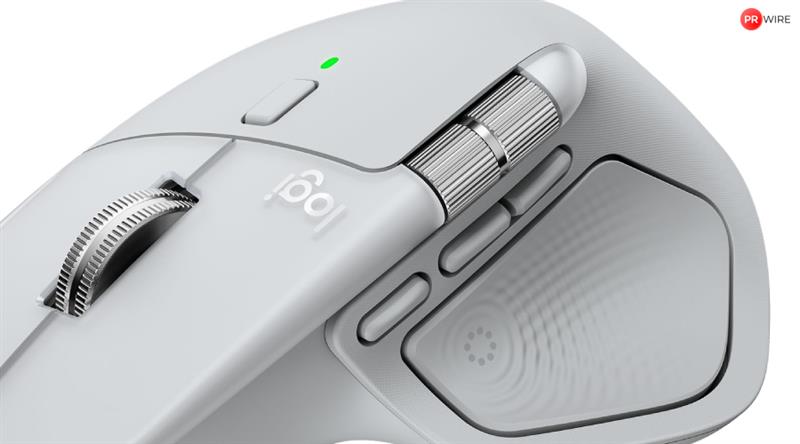
The MX Master 4 immediately feels like a serious work device. Its sculpted, right-handed design supports the palm naturally and keeps the wrist relaxed during long sessions. The thumb rest is wide and well-positioned, and the slightly increased size compared to earlier models gives it a confident, stable feel on the desk.
At roughly 150 grams, the mouse is heavier than compact or travel mice, but that weight adds to its sense of control and precision. The matte finish resists fingerprints and remains comfortable even after hours of continuous use. This is clearly a mouse designed to stay on a desk rather than move in and out of a backpack.
Logitech MX Master 4 wireless mouse review: Precision and scrolling experience
The MX Master 4 uses an 8,000 DPI sensor that tracks accurately on almost any surface, including glass. This makes it especially useful for users who work across multiple desks or shared spaces without a mouse mat.
Scrolling remains one of the MX Master line’s biggest strengths. Logitech’s MagSpeed scroll wheel smoothly switches between tactile, line-by-line scrolling and fast free-spin mode. Navigating long documents, spreadsheets, or timelines feels effortless and intuitive.
Logitech has also introduced a new Actions Ring system through its software, allowing context-based shortcuts depending on the app in use. After a few days of customisation, these shortcuts genuinely reduced repetitive actions and made daily workflows feel faster and more fluid.
Logitech MX Master 4 wireless mouse review: Buttons, customisation and software
The MX Master 4 offers a generous set of buttons, including primary clicks, a thumb-operated horizontal scroll wheel, gesture controls, and programmable shortcuts. The clicks themselves are quiet and controlled, making the mouse well-suited for shared offices and home workspaces alike.
Customisation is handled through Logi Options+, which allows per-app button mapping and gesture control. You can assign shortcuts for switching desktops, adjusting volume, launching tools, or controlling creative software. While the mouse works perfectly without installing the software, much of its real value unlocks once Options+ is set up.
Switching between up to three devices is seamless, whether connected via Bluetooth or the included USB receiver. This is especially useful for users working across a laptop, desktop, and tablet in the same day.
Logitech MX Master 4 wireless mouse review: Battery life and charging
Battery life is excellent. Logitech claims up to 70 days on a full charge, and in real-world mixed usage, that estimate feels realistic. Even with daily work sessions, the battery drains slowly enough that charging becomes an occasional task rather than a routine one.
The mouse charges via USB-C, and a quick one-minute charge can deliver several hours of use in an emergency. For professionals who rely on their mouse throughout the day, this reliability adds real peace of mind.
Logitech MX Master 4 wireless mouse review: Limitations to keep in mind
The MX Master 4 is designed exclusively for right-handed users, with no left-handed variant available. That remains one of the most significant drawbacks of the MX Master lineup.
Additionally, some advanced features also depend on Logitech’s software, which may not appeal to users who prefer a plug-and-play experience without additional utilities.
Logitech MX Master 4 wireless mouse review: Verdict
The Logitech MX Master 4 is one of the best productivity mice available today. It combines excellent ergonomics, precise tracking, exceptional scrolling, long battery life, and deep customisation into a single, thoughtfully designed tool.
It is not meant for gaming enthusiasts, and left-handed users are unfortunately left out. However, for professionals, creators, developers, and anyone who spends hours navigating documents, timelines, or creative software, the MX Master 4 offers real improvements to comfort and efficiency.
The article originally appeared on Hindustan Times